When connecting to BulletProof FTP Server, Internet Explorer can't see any of my files.
You need to enable Passive-Mode in Internet Explorer.
In order to browse BulletProof FTP Server from Internet Explorer, when you're computer is behind a firewall; you must enable Passive-Mode in Internet Explorer.
Open Internet Explorer from the Start Menu or command-line (iexplore.exe)
In Internet Explorer, pull-down Tools and select the menu option "Internet Options...".
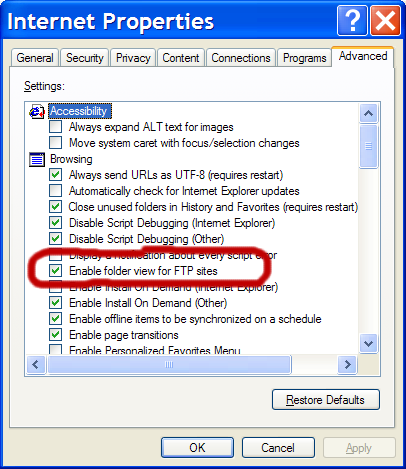
In the Internet Options window, click the Advanced tab.
Find the setting labeled Enable folder view for FTP Sites and make sure it has been checked-on.
Next, find the setting labeled "Use Passive FTP" and make sure it has been checked-on.
Click OK or APPLY to save the settings.
Note: It is not necessary to reboot your computer for these settings to take effect.


 When connecting to BulletProof FTP Server, Internet Explorer can't see any of my files.
 You need to enable Passive-Mode in Internet Explorer.